Selected WorkProject 08Document Automation
SharePointAutomation.
Incoming documents classified and filed into the right SharePoint folder — with missing folders created on the way.
An n8n workflow receives documents by webhook, classifies each one from its content and file metadata, resolves its SharePoint folder — company, project address, stage and document folder — and uploads it there.
- n8n
- SharePoint
- Webhooks
08Project
of 15
 Open the full SharePoint Automation (opens in a new tab)
- Document Automation
- n8n workflow
- Webhook intake to SharePoint folder
- Workflow built in n8n
01The Brief
Every document, in the right folder.
Documents arrive by webhook and each one has to end up in the correct SharePoint folder — company, project address, stage and document folder — even when some of those folders do not exist yet.
Classify each incoming document and file it, creating any missing folder first.
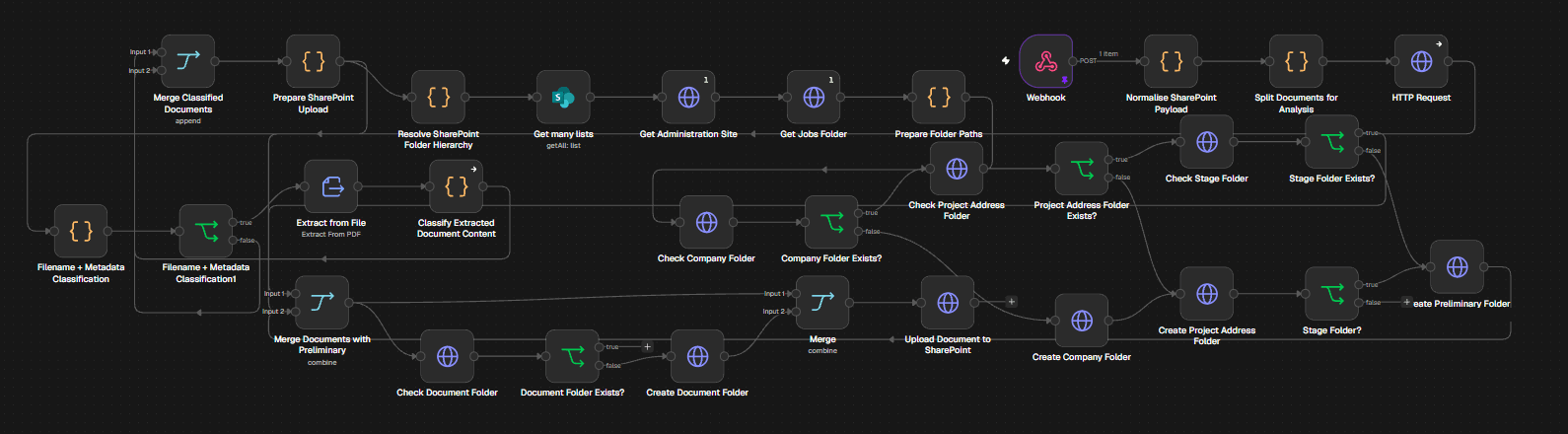
SharePoint Automation: the full workflow capture. Select it to open full size.
02The Workflow
Every document, filed where it belongs.
An n8n workflow receives documents by webhook, classifies each one from its content and file metadata, resolves its SharePoint folder — company, project address, stage and document folder — and uploads it there.
- Documents arrive by webhook; the payload is normalised and split into individual files.
- None: rules and timing only
- SharePoint upload
03How It Works
Intake, classify, resolve, file.
Each stage, read straight off the workflow’s own node names.
Intake
Webhook · Normalise SharePoint payload · Split documents for analysis
Classify
Extract from file · Classify extracted document content · Filename + metadata classification
Resolve folders
Get administration site and jobs folder · Check company, project address, stage and document folders · Create any folder that is missing
File
Merge classified documents · Prepare SharePoint upload · Upload document to SharePoint
04Architecture
The workflow, start to finish.
The same steps, arranged as they run: in sequence, or split into parallel paths.
01Intake
- TriggerWebhook
- RulesNormalise and split documents
02Classify
- RulesExtract from file
- Code stepsClassify content and metadata
03Resolve folders
- Company · address · stage · documentCheck each folder level
- RulesCreate any missing folder
04File
- RulesMerge and prepare upload
- OutputUpload to SharePoint (Third-party handoff)
- Workflow step
- Third-party platform
Documents are split, classified in code steps, matched to a folder path that is checked level by level, then uploaded to SharePoint.
05Validation & Controls
Classification, checks and filing.
Every level of the folder path is checked before anything is uploaded.
- IntakeBuilt
- ClassifyBuilt
- Resolve foldersBuilt
- FileBuilt
- Webhook intake: Documents arrive by webhook; the payload is normalised and split into individual files.
- Classification: Text extracted from each file, together with its filename and metadata, is classified in code steps.
- Folder checks: Each level of the folder path is checked, and a missing company, project address, stage or document folder is created first.
- SharePoint upload: Each document is uploaded to its resolved folder in SharePoint.
06The Stack
Each tool has a defined job in the workflow.
Roles over logos. Only the tools in the workflow are listed.
n8n
Runs the workflow, classification and folder logic
SharePoint
Destination folders and document storage
Webhooks
Receives incoming documents
07The Outcome
What the workflow does.
Incoming documents classified and filed into the right SharePoint folder — with missing folders created on the way.
Receives documents by webhook, extracts and classifies their content and file metadata, then resolves the SharePoint folder hierarchy — company, project address, stage and document folders — creating any that are missing before uploading each document to its folder.
- Workflow Design
- Systems Integration
- Documents arrive by webhook; the payload is normalised and split into individual files.
- Text extracted from each file, together with its filename and metadata, is classified in code steps.
- Each level of the folder path is checked, and a missing company, project address, stage or document folder is created first.
- Each document is uploaded to its resolved folder in SharePoint.
Contact
Have a workflow, dashboard or CRM that needs fixing? Let’s talk.
Available for new projects
Tell me about the operation, the systems involved and where the work gets stuck. A short call is usually enough to see whether I can help.