Selected WorkProject 09Document Automation
AI-PoweredPDF-to-StructuredData Automation.
PDFs turned into clean, structured JSON — saved back to Drive, with a notification.
A Make scenario watches a Google Drive folder for PDFs, converts each to text, extracts structured data with AI, cleans and parses the JSON, then saves the result to Drive and sends an email.
- Make
- Google Drive
- AI
- Gmail
09Project
of 15
 Open the full AI-Powered PDF-to-Structured Data Automation (opens in a new tab)
- Document Automation
- Make workflow
- Incoming PDF to structured JSON
- Workflow built in Make
01The Brief
From PDF to usable data.
PDFs land in a Google Drive folder and their contents need to come out as structured data that can be used elsewhere, with a notification when each one is done.
Turn each incoming PDF into clean, parsed JSON, saved back to Drive.
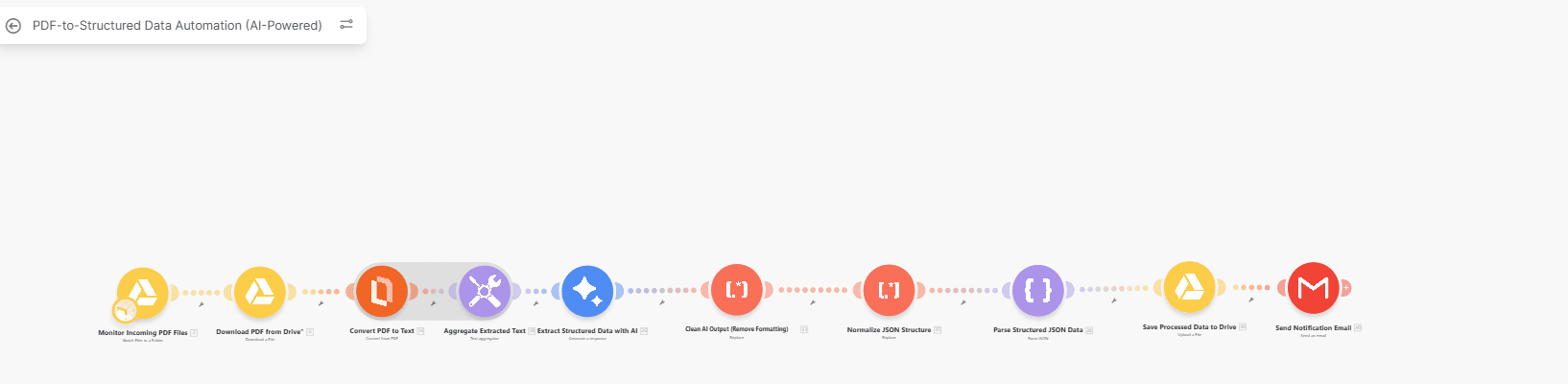
AI-Powered PDF-to-Structured Data Automation: the full workflow capture. Select it to open full size.
02The Workflow
From PDF to parsed JSON.
A Make scenario watches a Google Drive folder for PDFs, converts each to text, extracts structured data with AI, cleans and parses the JSON, then saves the result to Drive and sends an email.
- A new PDF in the watched Google Drive folder starts the scenario, and the file is downloaded.
- Structured extraction
- Drive and email
03How It Works
Trigger, extract, structure, deliver.
Each stage, read straight off the workflow’s own node names.
Trigger
Monitor incoming PDF files (Google Drive) · Download PDF from Drive
Extract
Convert PDF to text · Aggregate extracted text · Extract structured data with AI
Structure
Clean AI output · Normalize JSON structure · Parse structured JSON data
Deliver
Save processed data to Drive · Send notification email
04Architecture
The workflow, start to finish.
The same steps, arranged as they run: in sequence, or split into parallel paths.
01Trigger
- TriggerWatch Drive folder for PDFs
- Google DriveDownload the PDF
02Extract
- RulesConvert PDF to text
- RulesAggregate extracted text
- AIExtract structured data
03Structure
- RulesClean AI output
- RulesNormalise JSON structure
- RulesParse structured JSON
04Deliver
- OutputSave processed data to Drive
- OutputSend notification email
- Workflow step
One AI step sits between deterministic steps: text conversion before it, clean-up and JSON parsing after it.
05Validation & Controls
Where AI runs — and where rules do.
AI extracts the data; rules clean and parse it into a predictable shape.
- TriggerBuilt
- ExtractBuilt
- StructureBuilt
- DeliverBuilt
- Drive watch: A new PDF in the watched Google Drive folder starts the scenario, and the file is downloaded.
- Text conversion: Each PDF is converted to text and the extracted text aggregated before any AI step.
- Structured extraction: An AI step extracts structured data from the text.
- Clean-up and parsing: The AI output is cleaned, normalised and parsed as JSON, so the saved result has a predictable structure.
- Drive and email: The processed data is saved back to Drive and a notification email is sent.
06The Stack
Each tool has a defined job in the workflow.
Roles over logos. Only the tools in the workflow are listed.
Make
Runs the scenario
Google Drive
Watched folder in, processed data out
AI
Extracts structured data from the PDF text
Gmail
Notification email
07The Outcome
What the workflow does.
PDFs turned into clean, structured JSON — saved back to Drive, with a notification.
Watches a Google Drive folder for incoming PDFs, converts each one to text and uses AI to extract structured data, then cleans and parses the JSON, saves the result back to Drive and sends a notification email.
- Workflow Design
- Systems Integration
- A new PDF in the watched Google Drive folder starts the scenario, and the file is downloaded.
- Each PDF is converted to text and the extracted text aggregated before any AI step.
- An AI step extracts structured data from the text.
- The AI output is cleaned, normalised and parsed as JSON, so the saved result has a predictable structure.
- The processed data is saved back to Drive and a notification email is sent.
Contact
Have a workflow, dashboard or CRM that needs fixing? Let’s talk.
Available for new projects
Tell me about the operation, the systems involved and where the work gets stuck. A short call is usually enough to see whether I can help.