Selected WorkProject 10AI Automation
HubSpot BriefAutomation &AI Summarization.
Deal briefs summarised by ChatGPT and posted to Slack, with the deal moved along in HubSpot.
A Make scenario watches HubSpot deals, downloads each attached brief and extracts its text, has ChatGPT summarise it, posts the summary to Slack, updates the deal stage and sends an email notification.
- Make
- HubSpot
- OpenAI
- Slack
- Gmail
10Project
of 15
 Open the full HubSpot Brief Automation & AI Summarization (opens in a new tab)
- AI Automation
- Make workflow
- Deal brief to Slack summary
- Workflow built in Make
01The Brief
Every brief, summarised where the team works.
Deals in HubSpot carry an attached brief. Each one needs reading and summarising for the team, with the deal moved along as it goes.
Summarise each deal’s brief with ChatGPT, post it to Slack and keep the deal stage in step.
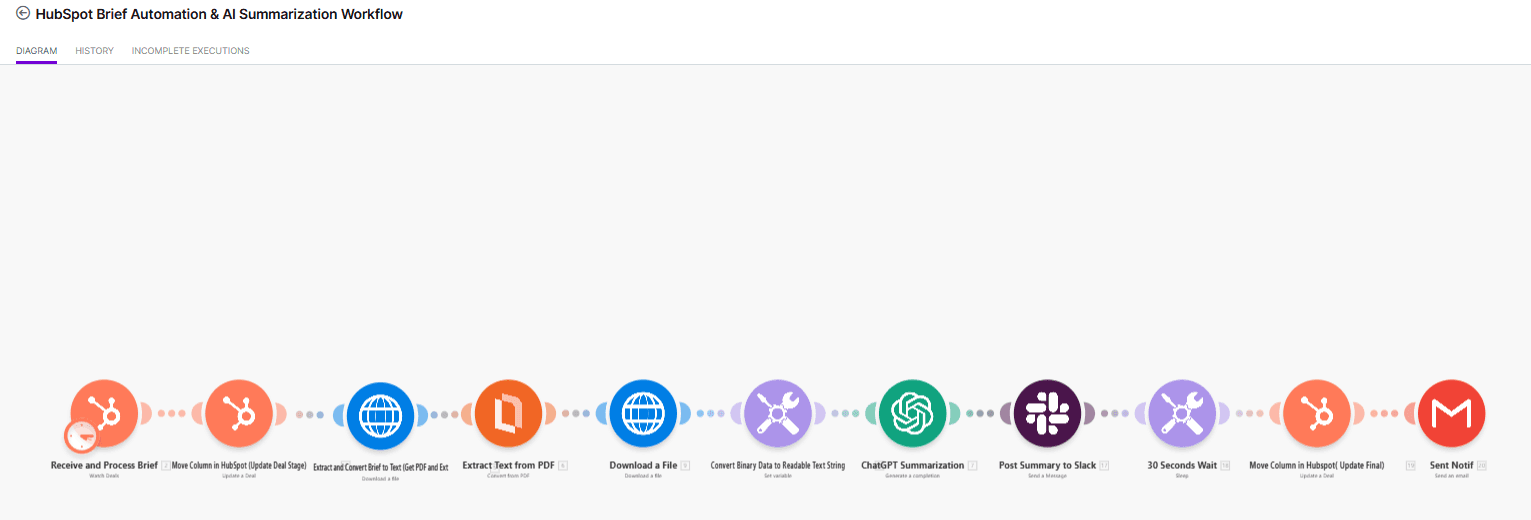
HubSpot Brief Automation & AI Summarization: the full workflow capture. Select it to open full size.
02The Workflow
From deal brief to Slack summary.
A Make scenario watches HubSpot deals, downloads each attached brief and extracts its text, has ChatGPT summarise it, posts the summary to Slack, updates the deal stage and sends an email notification.
- Watched HubSpot deals start the scenario, and the deal moves to its next stage.
- ChatGPT summary
- Slack, HubSpot and email
03How It Works
Trigger, extract, summarise, close out.
Each stage, read straight off the workflow’s own node names.
Trigger
Receive and process brief (watch deals) · Move column in HubSpot (update deal stage)
Extract
Download the brief · Extract text from PDF · Convert binary data to readable text
Summarise
ChatGPT summarization · Post summary to Slack
Close out
30-second wait · Move column in HubSpot (update final) · Send email notification
04Architecture
The workflow, start to finish.
The same steps, arranged as they run: in sequence, or split into parallel paths.
01Trigger
- TriggerWatch HubSpot deals
- HubSpotMove deal to next stage
02Extract
- RulesDownload the brief
- RulesExtract text from PDF
- RulesConvert to readable text
03Summarise
- AI · OpenAIChatGPT summary
- OutputPost summary to Slack
04Close out
- Timing30-second wait
- HubSpotUpdate deal stage
- OutputSend email notification
- Workflow step
The brief’s text is extracted by deterministic steps; ChatGPT writes the summary; HubSpot, Slack and email are updated around it.
05Validation & Controls
Where AI runs — and where rules do.
ChatGPT writes the summary; the rest of the scenario moves the deal and tells people.
- TriggerBuilt
- ExtractBuilt
- SummariseBuilt
- Close outBuilt
- Deal watch: Watched HubSpot deals start the scenario, and the deal moves to its next stage.
- Text extraction: The attached brief is downloaded, its PDF text extracted and converted to readable text.
- ChatGPT summary: ChatGPT summarises the brief.
- Slack, HubSpot and email: The summary is posted to Slack; after a 30-second wait the deal is updated again and an email notification goes out.
06The Stack
Each tool has a defined job in the workflow.
Roles over logos. Only the tools in the workflow are listed.
Make
Runs the scenario
HubSpot
Watched deals and stage updates
OpenAI
ChatGPT summary of the brief
Slack
Where the summary is posted
Gmail
Email notification
07The Outcome
What the workflow does.
Deal briefs summarised by ChatGPT and posted to Slack, with the deal moved along in HubSpot.
Watches HubSpot deals and moves each one to the next stage, downloads the attached brief and extracts its text, then has ChatGPT summarise it, posts the summary to Slack, updates the deal again and sends an email notification.
- Workflow Design
- Systems Integration
- Watched HubSpot deals start the scenario, and the deal moves to its next stage.
- The attached brief is downloaded, its PDF text extracted and converted to readable text.
- ChatGPT summarises the brief.
- The summary is posted to Slack; after a 30-second wait the deal is updated again and an email notification goes out.
Contact
Have a workflow, dashboard or CRM that needs fixing? Let’s talk.
Available for new projects
Tell me about the operation, the systems involved and where the work gets stuck. A short call is usually enough to see whether I can help.