Selected WorkProject 12Content Automation
AutomatedVideo Upload& Publishing.
New files in Drive published to a Facebook Page as video, with two AI steps on the way.
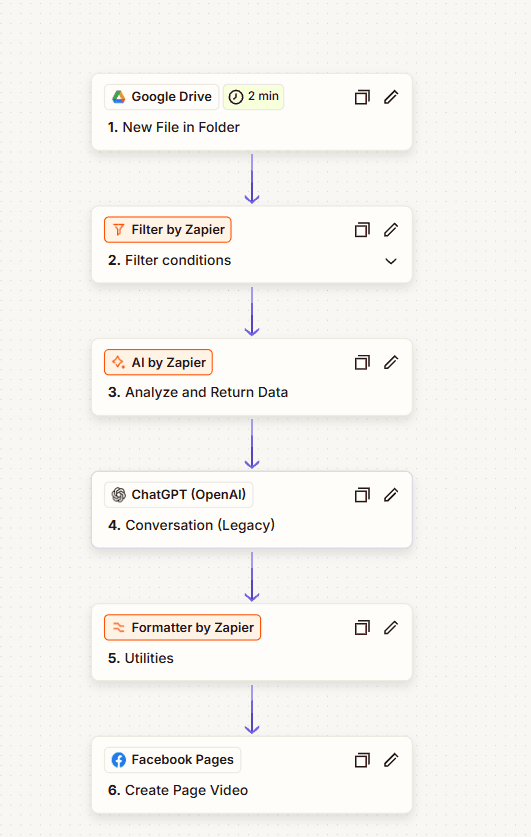
When a new file lands in a watched Google Drive folder, the Zap filters it, runs it through AI by Zapier and ChatGPT, formats the result and creates a video post on a Facebook Page.
- Zapier
- Google Drive
- OpenAI
- Facebook Pages
12Project
of 15
 Open the full Automated Video Upload & Publishing (opens in a new tab)
- Content Automation
- Zapier workflow
- Drive file to Facebook Page video
- Workflow built in Zapier
01The Brief
From a Drive folder to a Facebook Page.
New files dropped into a Google Drive folder need to reach a Facebook Page as video posts, prepared on the way.
Publish each new file in the folder to the Facebook Page as a video, with AI steps preparing it.
Automated Video Upload & Publishing: the full workflow capture. Select it to open full size.
02The Workflow
From Drive folder to Page video.
When a new file lands in a watched Google Drive folder, the Zap filters it, runs it through AI by Zapier and ChatGPT, formats the result and creates a video post on a Facebook Page.
- A new file in the Drive folder starts the Zap, and a filter decides whether it continues.
- AI by Zapier, then ChatGPT
- Facebook Page video
03How It Works
Trigger, AI, publish.
Each stage, read straight off the workflow’s own node names.
Trigger
Google Drive: new file in folder · Filter conditions
AI
AI by Zapier: analyze and return data · ChatGPT conversation
Publish
Formatter utilities · Facebook Pages: create page video
04Architecture
The workflow, start to finish.
The same steps, arranged as they run: in sequence, or split into parallel paths.
01Trigger
- TriggerGoogle Drive: new file
- RulesFilter conditions
02AI
- AIAI by Zapier: analyse and return data
- AI · OpenAIChatGPT conversation
03Publish
- RulesFormatter utilities
- OutputFacebook Pages: create page video (Third-party handoff)
- Workflow step
- Third-party platform
A filtered Drive trigger, two AI steps, a formatter, then the video published to the Facebook Page.
05Validation & Controls
Where AI runs — and where rules do.
A filter decides what goes through; two AI steps prepare it before it is formatted and published.
- TriggerBuilt
- AIBuilt
- PublishBuilt
- Drive watch and filter: A new file in the Drive folder starts the Zap, and a filter decides whether it continues.
- AI by Zapier, then ChatGPT: AI by Zapier analyses the file and returns data; a ChatGPT step then continues from it.
- Formatter: A formatter step prepares the result for publishing.
- Facebook Page video: The video is published to the Facebook Page.
06The Stack
Each tool has a defined job in the workflow.
Roles over logos. Only the tools in the workflow are listed.
Zapier
Runs the Zap
Google Drive
Watched folder for new files
OpenAI
ChatGPT step on the file’s data
Facebook Pages
Where the video is published
07The Outcome
What the workflow does.
New files in Drive published to a Facebook Page as video, with two AI steps on the way.
When a new file lands in a Google Drive folder, the Zap filters it, runs it through AI by Zapier and ChatGPT, formats the result and publishes it to a Facebook Page as a video.
- Workflow Design
- Systems Integration
- A new file in the Drive folder starts the Zap, and a filter decides whether it continues.
- AI by Zapier analyses the file and returns data; a ChatGPT step then continues from it.
- A formatter step prepares the result for publishing.
- The video is published to the Facebook Page.
Contact
Have a workflow, dashboard or CRM that needs fixing? Let’s talk.
Available for new projects
Tell me about the operation, the systems involved and where the work gets stuck. A short call is usually enough to see whether I can help.