Selected WorkProject 05Automation
AutomationSystems.
Finance, CRM and sales-operations workflows built in Zapier and Make.
Integration workflows connecting accounting, project management, CRM and lead sources, each built around a specific operational handoff.
- Zapier
- Make
- Xero
- Asana
- Apollo
- Slack
- Google Workspace
05Project
of 15
 Open the full Automation Systems (opens in a new tab)
 Open the full Workflows (opens in a new tab)
- Accounting, project, CRM and lead tools
- Integration automation
- Finance, CRM and sales-operations handoffs
- Workflows built in Zapier and Make
01The Challenge
Information re-keyed at every handoff.
Information moved between accounting, project management, CRM and lead sources by hand — re-keyed invoices, manual follow-ups and ad-hoc lead assignment.
Build each workflow around a single handoff: an invoice, a pipeline stage, a new lead, a report.
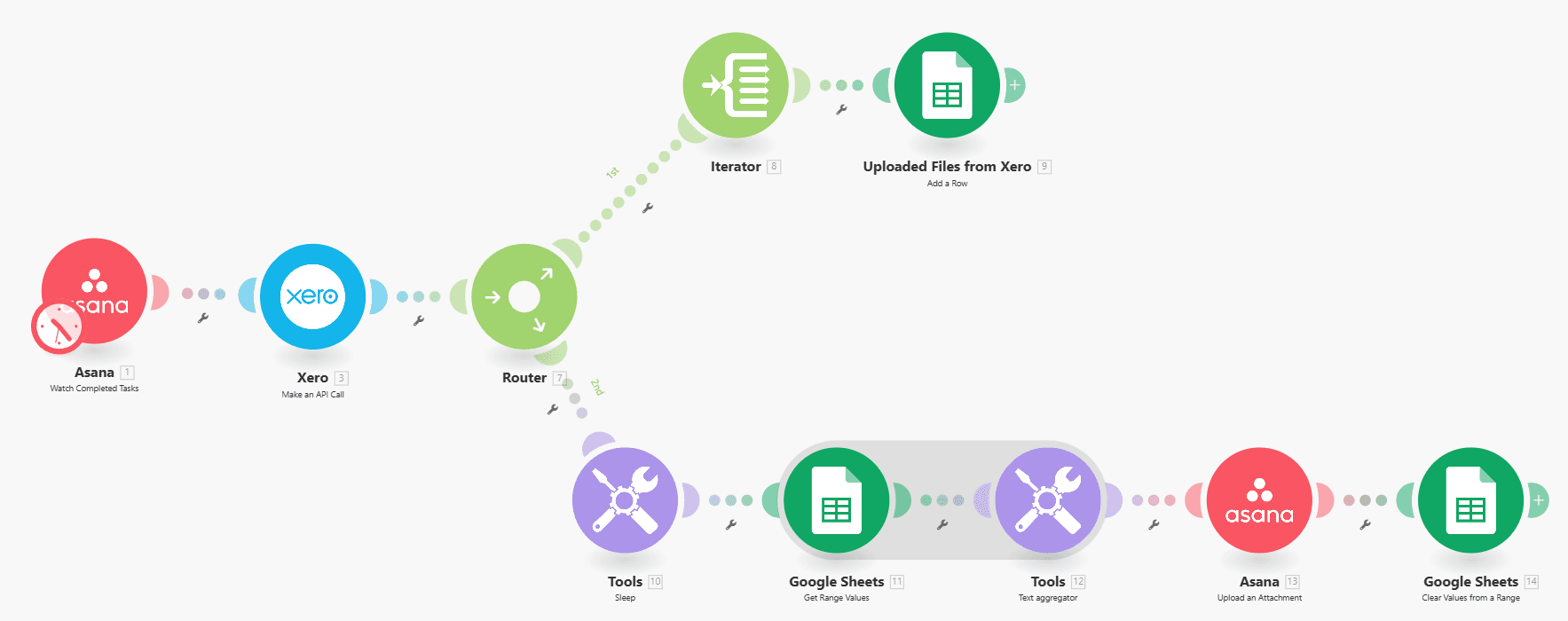
Xero transactions to Asana: Make scenario with Asana trigger, Xero API call, Google Sheets and Asana upload.
02Selected Workflows
Five workflows. Five handoffs.
A set of Zapier and Make workflows, each centred on a single handoff: an invoice, a pipeline stage, a new lead, a report.
Xero, Asana, Google Sheets, Apollo, Slack and email, connected through Zapier and Make.
- Zapier and Make
- Xero, Asana, Google Sheets, Apollo, Slack, email
- Duplicate checks, daily caps, team notifications
03How It Works
One handoff per workflow.
The same four steps run through every workflow.
Trigger
An invoice webhook, an Asana task update or a new lead starts a workflow.
TriggerOrchestrate
Zapier or Make carries the data through the workflow’s own steps.
Zapier · MakeCheck
Before writing: a duplicate invoice check, find-or-create the Xero contact, skip reps at their daily cap.
RulesWrite & notify
Records land in Xero, Google Sheets or Asana; the team is notified, and a duplicate raises an alert.
Output
- Open the full Asana sales pipeline capture (opens in a new tab)Asana sales pipeline
04Architecture
Two orchestrators between the tools a business already uses.
Triggers from finance, projects and sales; Zapier and Make in the middle; rule-based checks before anything is written.
01Trigger
- FinanceInvoice webhook
- ProjectsAsana task updates
- SalesNew leads
02Orchestrate
- WorkflowsZapierScenariosMake
03Check
- RulesDuplicate invoice check
- RulesFind or create the Xero contact
- RulesSkip reps at their daily cap
04Write
- AccountingXeroRecordsGoogle Sheets
- ReportsAsanaEnrichmentApollo
- NotificationsSlack & email
- Workflow step
Each workflow runs one handoff: a trigger, Zapier or Make, rule-based checks, then the write and a notification.
05Validation & Controls
Checks where systems meet.
Duplicates are caught, limits are respected, and the team is told what happened.
- Xero transactions to AsanaBuilt
- Draft invoices in XeroBuilt
- Asana sales pipelineBuilt
- Lead enrichmentBuilt
- Round-robin lead distributionBuilt
- Duplicate invoice check · find or create the Xero contact · skip reps at their daily cap.
- An alert is raised · no second invoice is created.
- Team notified of new draft invoices · lead assignments recorded in Google Sheets.
06The Stack
Each tool has a defined job in the system.
Roles over logos. Only integrations that exist in the build are listed.
Zapier
Invoice, pipeline and lead workflows
Make
Xero-to-Asana reporting scenario
Xero
Transactions and draft invoices
Asana
Pipeline tasks and reports
Apollo
Lead enrichment
Slack
Team notifications
Google Workspace
Sheets records, Drive folders and email
07The Outcome
What the workflows do.
Less data re-entry, follow-ups triggered by pipeline stage, and leads enriched and routed to reps in rotation.
Integration workflows connecting accounting, project management, CRM and lead sources, each built around a specific operational handoff.
- Workflow Design
- Systems Integration
- Moves Xero transactions into Asana reports via Google Sheets
- Creates draft Xero invoices, catching duplicates first
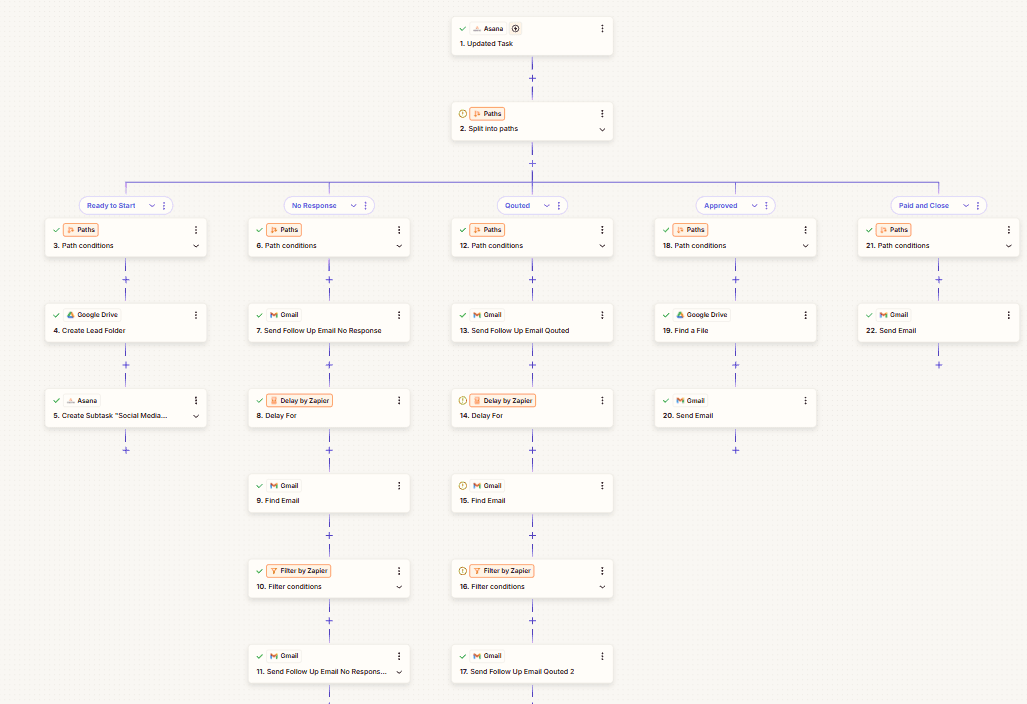
- Triggers pipeline follow-ups from Asana task stages
- Enriches leads and assigns them to reps in rotation
Contact
Have a workflow, dashboard or CRM that needs fixing? Let’s talk.
Available for new projects
Tell me about the operation, the systems involved and where the work gets stuck. A short call is usually enough to see whether I can help.